
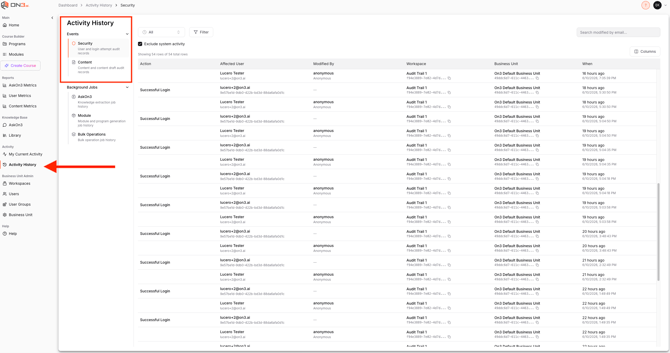
As part of On3's commitment to security and transparency, Activity History provides administrators with visibility into both security-related and content-related events across the platform.
This allows organizations to better understand who performed an action, when it occurred, and where it took place.
Who Can Access Activity History
The Activity History section is available to:
- Workspace Admins
- Business Unit Admins
These roles can review historical events and activity occurring within their accessible workspaces.
Accessing Activity History
To view activity history:
- Open the navigation menu
- Navigate to Activity History
- Review the available events and activity records
The report displays both security and content-related activity.
Security Events
Security events help administrators understand authentication and account-related activity occurring within the platform.
Examples of security events include:
- Successful user logins
- Login attempts
- Password reset activity
- When a password reset occurred
- Who initiated the action
- Which workspace the event occurred within
These events provide an audit trail of user access and account activity.
Content Events
Content events provide visibility into changes made to learning content and knowledge assets.
Examples include:
- Content modifications
- Content updates
- Content revisions
- Other content-related activities
For each event, administrators can review:
- What changed
- When the change occurred
- Who made the change
- Related activity connected to the event
This makes it easier to understand the history of a module, document, or other content item.
Benefits of Activity History
Activity History helps organizations:
- Improve transparency
- Maintain accountability
- Review user activity
- Monitor content changes
- Support security and auditing efforts
By centralizing event information, administrators can quickly understand how users and content are interacting within the platform.
Key Takeaways
- Activity History provides visibility into both security and content-related events
- Available to Workspace Admins and Business Unit Admins
- Security events include logins, login attempts, and password reset activity
- Content events track changes made to learning content
- Each event records what happened, when it happened, and who performed the action