
Your On3 Learn App makes it easy to contact our Support Team whenever you need help. Whether you’re experiencing a technical issue, need clarification, or want to report a concern, you can reach out directly from within the app.
Follow the steps below to get in touch with On3 Customer Care.
Step 1: Open Your Settings Menu
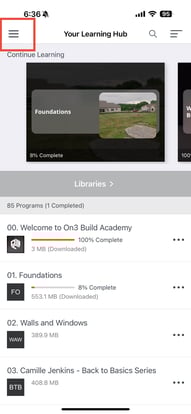
From your Learning Hub page:
-
Tap the three lines (☰) located in the upper-left corner of the screen.
-
This will take you to your Settings page.
Step 2: Select “Email Customer Care”
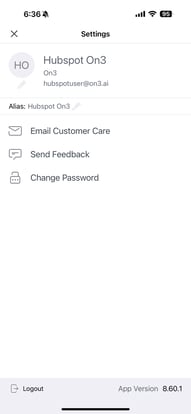
On your Settings page:
-
Tap Email Customer Care
This will automatically open your device’s default email application.
Step 3: Send Your Support Request
Once your email editor opens:
-
Your registered email address will auto-populate
-
Your device may ask you to choose which email account to use (if you have more than one)
In the message body, please include:
-
A description of the issue
-
Steps leading up to the problem
-
Screenshots (if possible)
-
Any additional details that will help us assist you
After sending, our Support Team will review your message and reach out with a response.
Response Time
You can expect a reply from our Support Team within 24–48 business hours.