
The On3 Learn App is designed to support continuous learning for field employees—anytime, anywhere. Since many field environments have limited or unreliable network access, it’s essential for learners to be able to view training materials without depending on an internet connection.
To address this need, On3 Learn provides Offline eLearning, allowing you to download courses in advance and access them even when you’re offline.
Why Offline eLearning Matters
Offline eLearning ensures that field employees can still access:
-
Step-by-step task instructions
-
Critical job information
-
Safety reminders
-
Important process updates
…even when there’s no signal or internet connection available.
This makes learning more flexible, reliable, and supportive of real-world field conditions.
How to Download Courses for Offline Use
Follow the steps below to set up your offline content:
1. Connect to the Internet
Make sure your device is online before downloading any course.
2. Open Your Course List
Browse the available courses in your Learning Journey.
3. Download a Course
-
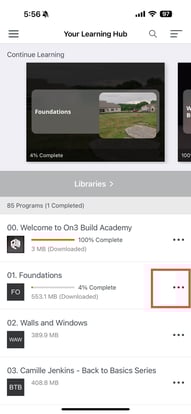
Tap the three dots (⋮) next to the course title
-
A pop-up menu will appear
-
Select “Download to Device”
.jpg?width=191&height=415&name=IMG_6003%20(1).jpg)
4. Wait for the Download to Complete
A progress indicator will show you the download status.
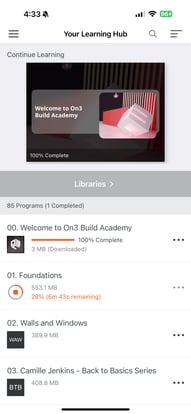
Once finished, the course is stored inside the On3 App and can be accessed anytime—even without internet.
Managing Your Offline Courses
You can:
-
Access downloaded courses offline
-
Delete completed courses to free up space
-
Re-download content when needed
Deleting old or completed courses is recommended to keep your device storage optimized.
.jpg?width=191&height=415&name=IMG_6004%20(1).jpg)
How On3 Learn Protects Course Security
For security purposes:
-
Downloaded courses do not save directly onto your device’s file storage
-
They remain securely inside the On3 Learn App
-
Your learning progress is stored safely and will sync automatically the next time you reconnect to the internet
This ensures your Learning Journey stays accurate and up-to-date—whether you’re online or offline.