
If you encounter an issue while taking a course—or want to suggest improvements—the On3 App allows you to quickly send feedback directly from the learning screen. This ensures that your comments reach the right team so we can assist you and continuously improve your learning experience.
Follow the steps below to report a problem or share feedback.
How to Send Feedback From a Course
1. Open the Course
Go to the specific Learning Course where you experienced the issue or want to provide suggestions.
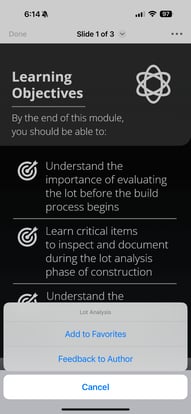
2. Tap the Three Dots (⋮)
At the top-right corner of the course page, you will see a kebab menu (three dots).
Tap this to open more options.
3. Select “Feedback To Author”
4. Enter Your Feedback
You will be directed to the Feedback page.
In the space provided:
-
Describe the issue you encountered
-
Share comments or suggestions
-
Provide any details that can help us understand and resolve your concern
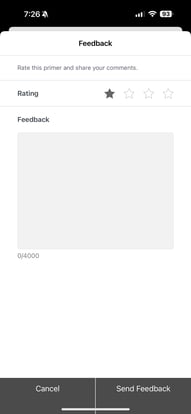
The more details you provide, the faster and more accurately we can assist you.
5. Expect a Response
After submitting your feedback, our team will review your message.
You can expect a response within 24–48 business hours.