
To help make your work easier and more efficient, Daily Tips are now included throughout your Learning Journey in On3. These short, practical insights provide helpful reminders, best practices, suggestions, and advice that you can use immediately on the job.
Daily Tips are designed to support you as you learn—enhancing your performance, strengthening habits, and guiding you through real-world tasks.
Where to Find Daily Tips
You can find “Today’s Tip” in the middle section of your main course page.
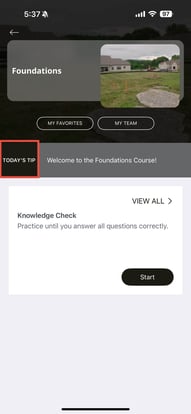
To view the full tip:
-
Click “Today’s Tip”
-
The complete content will open for you to read
These tips are updated regularly to give you meaningful insight each day.
Viewing and Managing Past Tips
You also have access to all previously released tips.
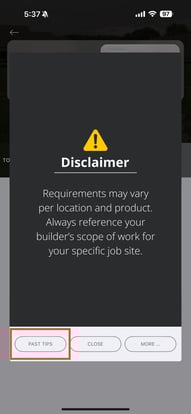
Past Tips
-
Click Past Tips
-
You will see a full list of earlier Daily Tips
-
You can revisit and review them anytime as a reference tool
This makes it easy to go back to helpful reminders or guidance you found valuable.
Saving and Organizing Your Tips
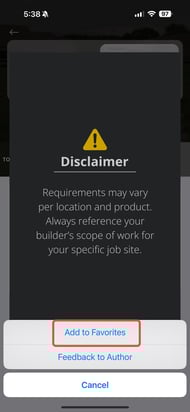
You can personalize your tips experience by:
-
Adding Daily Tips to your favorites
-
Removing tips from your favorites when no longer needed
-
Closing or hiding a tip you have already read
-
Accessing more options for additional actions
This allows you to keep track of the insights that matter most to you.
Why Daily Tips Matter
Daily Tips may include:
-
Helpful suggestions
-
Important reminders
-
Process improvements
-
Best practices
-
Quick hints
-
Warnings or caution notes
Use these tips to improve your workflow, enhance your skills, and boost your daily performance.
Don’t forget to check your Daily Tip—it may be exactly what you need to move through your day with confidence!