
The Programs section in your On3 Admin account allows you to view, manage, and understand all the learning programs available within your business unit. This guide walks you through the key features inside the Programs tab, including program details, libraries, and enrollments.
Accessing the Programs Tab
-
Log in to your On3 Admin account.
-
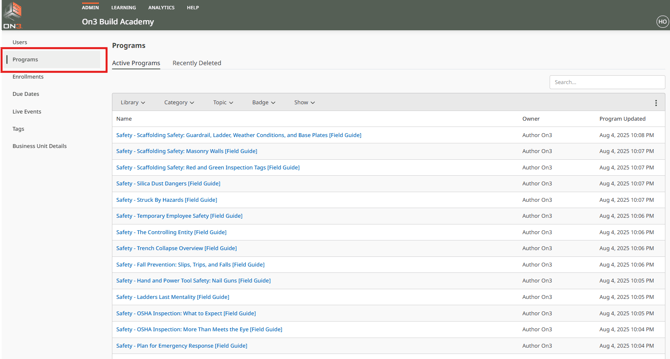
From the left taskbar, click Programs.
The Programs page displays the full list of learning programs available in your business unit. You may expand the list to show more items on one page for easier viewing.
Viewing Program Details
To learn more about a specific learning program:
-
Click on the title of the program.
-
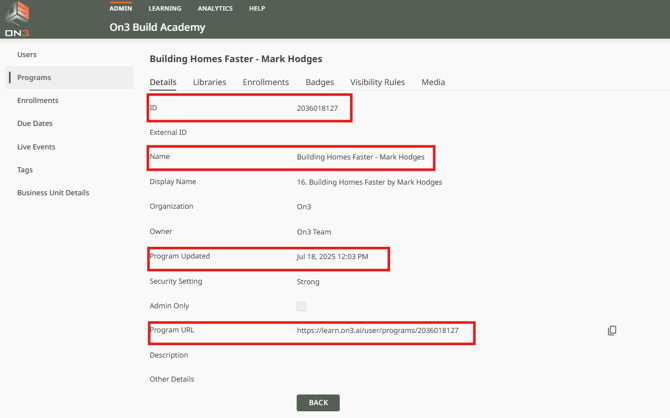
You will be taken to the Details tab.
The Details tab includes:
-
Program ID
-
Program title
-
Date of last update
- Program URL
This gives you a complete overview of the program’s identity and version history.
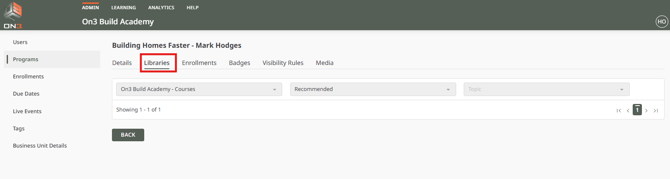
Understanding Libraries, Categories, and Topics
Programs can be organized into:
-
Libraries
-
Categories
-
Topics
These classifications determine:
-
How Programs appear on the On3 Learn Portal
-
How Users are granted access through Enrollments
Default Library and Category
Every business unit has a default Library and default Category.
-
Programs are placed in the business unit's default Library and default Category unless changed manually.
This ensures consistent organization of content across the platform.
Viewing Program Enrollments
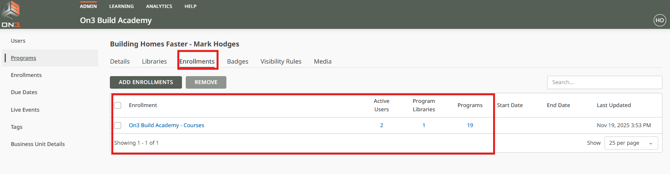
The Enrollments tab shows which enrollments and users have access to the program.
To view enrollments:
-
Open a program
-
Click the Enrollments tab
Here you can see:
-
Enrollments assigned in the program
-
Active users
- Number of programs inside the enrollment
How Enrollments Work
On3 Learn uses Enrollments to:
-
Group users
-
Grant access to Programs in both the Learning Portal and mobile app
This allows Admins to manage visibility and access in a structured, scalable way.
You’re Ready to Navigate Program Features
You should now be able to:
- Access and explore the Programs section
- View program details
- Understand Libraries, Categories, and Topics
- Check program enrollments
- Manage how users access each learning program