
The Favorites feature in the On3 App allows you to keep all your most important learning content in one convenient location. By saving frequently accessed materials, you can work more efficiently and stay focused on the topics that matter most to your role.
Why Use Favorites?
Favorites help you:
-
Quickly access frequently used content
-
Save time searching through multiple courses
-
Stay organized and efficient
-
Reinforce learning on topics that need extra practice
-
Ensure you’re always doing tasks the right way
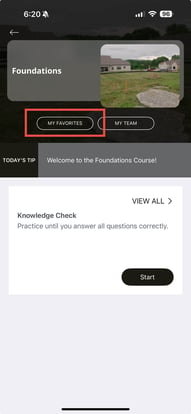
What You Can Add to Favorites
You can mark a variety of learning items as Favorites, depending on what you need easy access to:
1. Courses
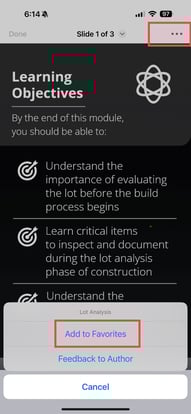
If you revisit certain courses often—or need to complete a course urgently—you can add it to your Favorites.
-
Tap the three dots (⋮) in the upper right corner of the course
-
Select Add to Favorites
2. Flashcards
If you need repeated practice on a specific topic, add the flashcard deck to your Favorites for quick access.
3. Today’s Tip
If you find the Daily Tip helpful and want to review it again later, you can mark it as a Favorite to keep it readily available.
4. Knowledge Checks
For concepts you want to master, add related Knowledge Checks to your Favorites so you can revisit them anytime.

How Favorites Improve Your Workflow
Favorites create a personalized learning hub that helps you:
-
Access important materials instantly
-
Focus on areas that need improvement
-
Build stronger habits through repetition
-
Reduce time spent scrolling through courses
-
Boost efficiency and productivity in the field
By keeping everything you need in one place, Favorites help you stay organized and confident in your day-to-day tasks.