
As a Supervisor, Team Leader, or Group Coach, you have visibility into the status of all coaching sessions and activities assigned to your learners. The Coaching tab in On3 Learn allows you to track progress, review submissions, and monitor acknowledgements across your team.
This article explains how to view coaching activities and understand their statuses.
How to Access Coaching Sessions
-
Log in to the On3 Learn website using your username and password.
-
Click the Coaching tab from the main navigation.
The Coaching landing page will display all coaching activities that are currently Waiting for Feedback by default.

Understanding Coaching Statuses
To view coaching activities by status:
-
Click Status in the Coaching tab.
-
Select the status you want to view.
You can filter coaching activities by the following statuses:
-
Waiting for learner’s submission
The learner has not yet submitted their coaching response. -
Waiting for learner’s acknowledgement
Feedback has been provided by the coach and is awaiting learner review or acknowledgement. -
Received learner’s acknowledgement
The learner has reviewed and acknowledged the coaching feedback.
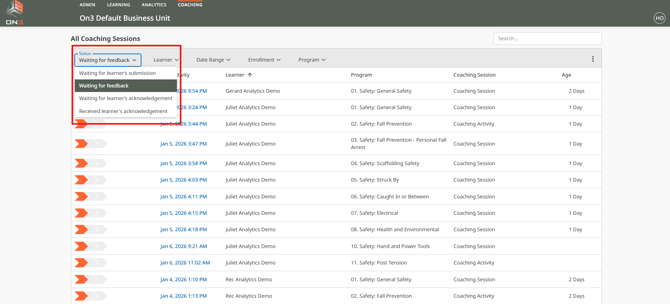
These statuses help you quickly identify where each coaching activity is in the review process.
Using Coaching Filters
To narrow down your results, you can apply filters within the Coaching tab. Available filters include:
-
Learner
-
Date Range
-
Enrollment
-
Program

Using filters allows you to efficiently manage large teams and focus on specific learners, programs, or time periods.
Next Steps
If you want to review learner submissions and provide feedback, refer to the related article:
👉 Reviewing and Providing Feedback on Coaching Sessions in On3 Learn
Summary
The Coaching tab gives supervisors and coaches full visibility into learner coaching activity by:
-
Displaying coaching statuses
-
Allowing filtering by learner, program, enrollment, or date
-
Helping you track submissions and acknowledgements
This ensures coaching remains timely, structured, and effective across your organization.